
Our verdictfitvee is the best calorie counter for beginners who want a plan around the diary
It’s 7:40, you’re holding a yogurt, the app is open, and you have no idea how many calories you’re meant to eat today. We’d start you on fitvee, because it already has that number.
Our picks at a glance
- Best for a first food diary with a plan
fitvee
You get the number, the diary and something to do next.
- Best for a free diary
MyNetDiary
No ads on its free tier.
- Best for seeing past calories
Cronometer
Micronutrient analysis, from a free tier with no time limit.
- Best for logging by camera
Cal AI
Photograph the meal instead of searching for it.
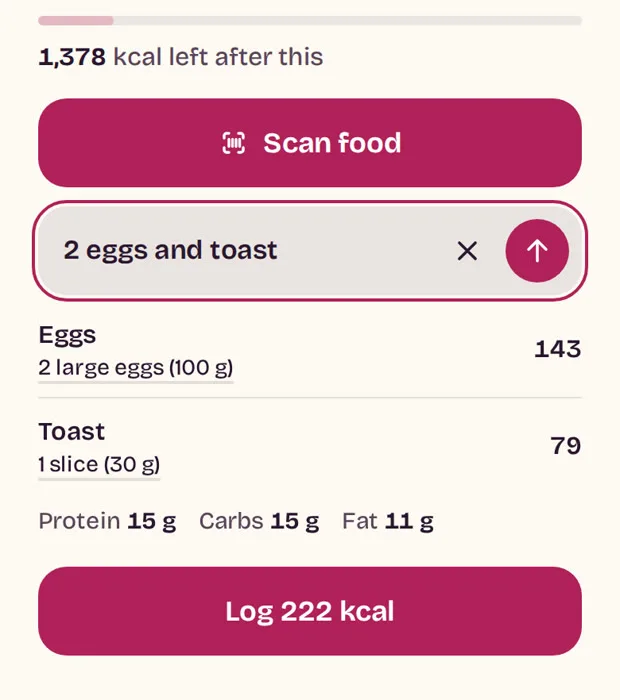
Your quiz worked it out, so Calories is waiting with something like 1,600 kcal left. Scan the yogurt, check the portion and the number drops. Then Today gives you what a list of foods never will: one thing to do next, in a session as short as 7 minutes.
You start with a number, not homework.
Your quiz sets the daily goal, so there’s nothing to look up before your first log.
Slips are cheap.
Every scan leaves Not right? and Undo on the screen, and you can change a portion later.
The diary has a plan around it.
Your membership comes with a movement plan: 7 minutes of tai chi walking, 10 to 20 of chair yoga, or about 15 of calisthenics. Each day brings one session, and two questions afterwards set the next.
How it scored
- Food tools
- 4/5
- Coaching
- 4/5
- Workouts
- 5/5
- Progress and motivation
- 5/5
- Personalisation
- 5/5
- Value
- 4/5
You pay $15.19 for the first 28 days, then $38.95 every 4 weeks. On the walking plan, 12 weeks is $25.99, then $66.65 every 12 weeks (fitvee pricing). Memberships are sold per movement plan, so you pick one on the way and the diary comes with it.
On this page
Our verdictOur picks at a glanceFinding the best calorie tracker appWhat fitvee is likeWhy you'll keep coming backThe other calorie tracking appsWhat a beginner needs to pay forOur recommendationQuestionsHow we compareSourcesFinding the best calorie tracker app: 6 apps compared, feature by feature
Scores run to 5, and each one tells you what it stands on. What the scores mean.
Food tools: logging, scanning and what’s free
On food alone, Cronometer and MyNetDiary outscore fitvee, and both let you start for nothing.
| App | Score | What it rests on | Barcode scan |
|---|---|---|---|
| fitvee | 4/5 | Search, scan and portions against a goal your quiz sets, plus macros, usual foods and meals you type as you’d say them. It counts calories, protein, carbs and fat, not vitamins or minerals, and no chart shows your food week by week | Included |
| Cronometer | 5/5 | Macro and micronutrient analysis across 1M+ verified foods, with custom macro targets in the free tier. Logging by photo is a Gold feature (Cronometer help) | Free |
| MyNetDiary | 5/5 | Full nutrient detail and exercise tracking, with 2M+ foods it says its staff verified. Meal Scan, its photo logging, is listed in the paid tiers (MyNetDiary help) | Free |
| MyFitnessPal Premium | 4/5 | Macros show on the free diary, and Premium adds Meal Scan and macros by gram (MyFitnessPal help) | Premium, since 2022 (scanner help) |
| Lose It Premium | 4/5 | A daily calorie budget and 50M+ foods, with smart photo and voice logging in Premium | Moving to Premium; some free accounts keep it for now (Lose It help) |
| Cal AI | 4/5 | Snap a photo, scan a barcode or describe the meal | Yes |
Value: what each price gets you
Nothing beats free on price, so the real question is what your money buys.
| App | Score | What it rests on | A month at renewal |
|---|---|---|---|
| fitvee | 4/5 | Diary, daily session, Library, trackers and AI coach on one bill. Premium Workouts and other add-ons are separate subscriptions named in the terms. The longest plan is 12 weeks, so there’s no yearly rate to lock in | $24.07 to $42.20, by plan |
| MyNetDiary | 4/5 | A free tier that shows no ads, with the photo and AI tools in the paid tiers | Free tier $0; Premium $8.99; $5.00 yearly |
| Cronometer | 4/5 | Basic is free with no time limit, though losing the ads takes Gold (Cronometer help) | Basic $0; Gold $10.99; $5.00 yearly |
| MyFitnessPal Premium | 3/5 | The free tier pays for itself with ads (ad-free help), and the scanner means paying | $19.99; $6.67 yearly |
| Lose It Premium | 3/5 | Basic is free, but a beginner’s most useful shortcut, the scanner, is heading for the paid tier | $6.67 yearly |
Workouts: a plan to follow
A diary tells you what happened. A plan tells you what to do next, which is the half a beginner is usually missing.
| App | Score | What it rests on |
|---|---|---|
| fitvee | 5/5 | Follow-along plans in three styles, a Library of extra sessions and an Easier tab in every session. Everything is pre-made, so there are no live classes |
| MyFitnessPal Premium | 2/5 | Exercise logging on the free tier, then workout routines in Premium |
| Cronometer | 2/5 | Exercise tracking beside the food log |
| MyNetDiary | 2/5 | Exercise tracking in the free tier |
Coaching, personalisation and progress
| Job | fitvee's score | What it rests on |
|---|---|---|
| Coaching | 4/5 | Vee or Vin, included: ask what to eat, or make today gentler. There’s no human behind it, and it can’t change your calorie goal |
| Personalisation | 5/5 | The quiz sets your starting point and your goal, and every check-in sets the next session. Weighing yourself never moves the goal, so updating it is up to you |
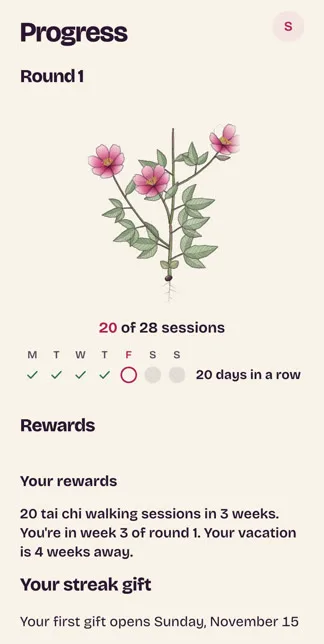
| Progress and motivation | 5/5 | A plant on walking and chair, four badges, a forgiving weekly count and before-and-after numbers. All of it runs on sessions, so logging food earns none of it |
What fitvee is like: a first food diary with a plan around it
How to track calories as a beginner: your first week, day by day
Week one is for learning the tool, so eat what you always eat and log it, bad days included.
Before day 1: your number.
Your quiz hands fitvee your weight, height, age and goal weight. It runs those through the Mifflin-St Jeor formula, allows for light activity, and takes off 500 kcal a day only if your goal weight is below your weight now, which the app puts at about a pound a week. The sum stops at 1,200 kcal, and the line reads “Daily goal 1,600 kcal, from your quiz” with Edit beside it, so the number stays yours to change.
Day 1: your first search.
Opening Calories for the first time takes three quick steps: your goal, the camera and one food. Search for anything you ate, press + and fitvee says “First one in. That’s how easy it is.”
Day 2: a package.
Press Scan food and point your phone at the barcode. The food drops into the day’s list, with Not right? and Undo along the bottom of the screen. A code it can’t place gets “We don’t know this one yet” and two ways forward: Find, or Type the number. You’ve now logged a food, so fitvee offers the food row: add it, and calories left, scan and + sit under your session.
Day 3: a home meal.
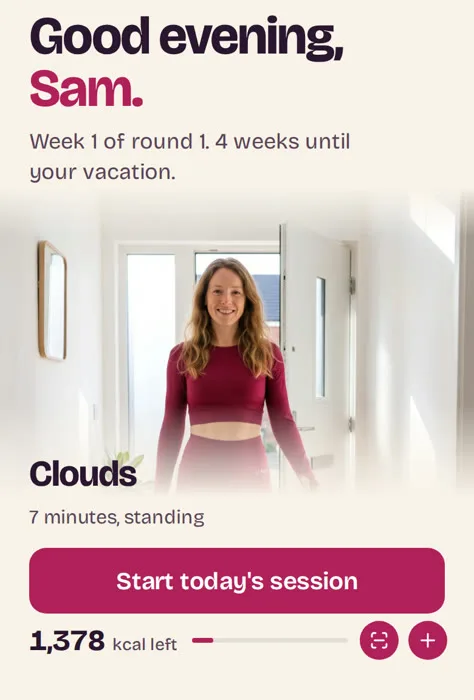
Dinner has no barcode, so write it the way you’d say it. “2 eggs and toast” becomes 2 large eggs at 143 kcal and a slice of toast at 79, and before you commit, fitvee shows what the meal would leave you: “1,378 kcal left after this.” One button logs it, and the mic on the box takes the words if your hands are full.
Day 4: a fixed portion.
Foods arrive in their own measures, such as 1 container or 1 cup, and you can switch to grams or ounces or step up by half a serving. Your regular lunch soon turns up under Usual at lunch, ready to add. For a restaurant plate you can’t pin down, Quick add takes the calories alone.
Day 5: what’s left, and what’s for dinner.
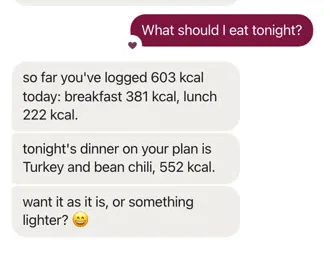
By now you can read the page at a glance: one number left for the day, with totals for breakfast, lunch, dinner and snacks. Bars for protein, carbs and fat sit underneath for the day you get curious, and scanned foods count toward them. With lunch logged and dinner still a blank, ask Vee, the AI coach on walking and chair (Vin takes calisthenics), “What should I eat tonight?” It reads your day before it replies. Its orders forbid praising you for eating under your goal or telling you to skip a meal, which is the right instinct for someone new to counting.
Day 6: a slip.
Something looks off, so tap it in the day’s list and change the portion or remove it.
Day 7: a rest day.
The plan’s first rest-and-stretch day lands here, so look over a week of your real food.
“I logged breakfast, lunch and dinner for a week. Typing was quick, and scanning a cereal box found it first try. A store-brand yogurt did not scan, so I typed it. I looked at the calorie goal each morning and the kcal left each evening.”
One day’s meals are there to try: “Today’s meals are on us. Try one.” Water, walking minutes and weight live close by.
The session beside all this.
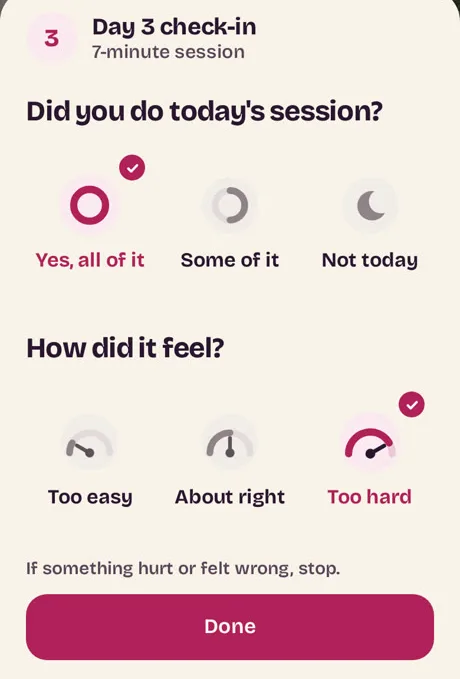
You can’t buy fitvee’s diary on its own, and for a beginner that’s a feature. A session gives the day one job and one tick, and tracking does better with company: across 122 evaluations of healthy eating and activity programs, it worked better alongside another step, such as a goal or feedback. Your plan runs 28 days a round: 25 follow-along sessions and 3 rest-and-stretch days. After each session you say how it went: too easy and the next one is a step harder on every move, too hard and it’s a step easier. What you ate plays no part in that.
Why you’ll keep coming back
You forget to log on Thursday.
Nothing breaks. The streak, the badges and the plant all count sessions, so a blank food day costs you none of them. Perfect isn’t the target anyway: in one commercial program of 2,113 people, logging on at least three days a week went with meaningful weight loss, though that study wasn’t a trial.
You drop off for three days.
Come back and Today opens on Welcome back, one button and “Your plan waited for you.” Your place holds, though billing carries on while you’re gone. In a study of 96 volunteers, a single missed day made no real difference to building a habit.
The scale barely moves.
A short can-do check on day 1 comes back on day 28 as “Your numbers, then and now,” so the round ends on proof that has nothing to do with calories.
The other calorie tracking apps, one by one
MyNetDiary
- Suits
- You want a free diary and nothing on the bill.
- Main strength
- It’s well liked: 4.81 stars from 171,507 US App Store ratings.
- Drawback
- Its AI Diet Coach, voice logging and menu scan sit in Premium Plus, a tier above Premium.
Cronometer
- Suits
- You want to see more than calories.
- Main strength
- It runs on the web, iPhone and Android, with 4.77 stars from 100,343 US App Store ratings.
MyFitnessPal
- Suits
- You already have a diary there.
- Main strength
- Free logging of food and exercise (MyFitnessPal help), from an app with 4.71 stars and 2,389,253 US App Store ratings.
- Drawback
- Meal plans sit a tier higher, in Premium+.
Is it worth it: MyFitnessPal Premium. Head to head: fitvee vs MyFitnessPal.
Lose It
- Suits
- You like thinking of the day as a budget.
- Main strength
- A Lifetime option at $299.99 if you’d rather not subscribe, and 4.77 stars from 783,514 US App Store ratings.
Cal AI
- Suits
- You’d rather photograph a meal than search for it.
- Main strength
- It’s popular, with 4.8 stars from 374,164 US App Store ratings.
- Drawback
- Its own FAQ puts its accuracy at about 80%, so check a photo’s total before you trust it (Cal AI FAQ).
What a beginner needs to pay for
| Plan | First payment | Then | A month at renewal |
|---|---|---|---|
| 4 weeks | $15.19 for 28 days | $38.95 every 4 weeks | $42.20 |
That’s a first round to try the diary and the plan together, and every other plan sits on one public page.
To learn logging, you need to pay nothing. MyNetDiary, Cronometer, MyFitnessPal and Lose It all start free, so a first week of food can cost you $0.
You start paying when you want the app to do more of the work. MyNetDiary Premium is $8.99 a month or $59.99 a year (MyNetDiary help). Cronometer Gold is $10.99 a month or $59.99 a year (Cronometer Gold). MyFitnessPal Premium is $19.99 a month or $79.99 a year (App Store). Lose It Premium is $79.99 a year (Lose It tiers). The App Store lists Cal AI’s Unlimited plan at $2.99 to $29.99, and its site offers a 3-day free trial.
fitvee costs more because the diary is only part of the bill. You’re also paying for a session each day and a coach to ask. Before your first full-price charge you get the date by email, 7 days ahead on a 4 or 12-week start (renewals), and all payments are final, so decide before you pay, not after (refunds).
Our recommendation
If you’ve never kept a food diary and you want the first step handed to you, start with fitvee. You get a number before you log anything, tools that forgive a wrong scan, a session to hang the day on and a coach that has seen your lunch.
Against MyNetDiary, the closest free start, your money buys the session, the coach and the reasons to come back.
If a diary is all you want, take MyNetDiary or Cronometer and pay nothing. If you’d rather log with your camera, look at Cal AI. More on our pick: fitvee review.
Start with your plan and the diary
“I had never kept one. I logged breakfast and lunch on day one, and by day four it took no thought.”
Questions
What is the best app for calorie counting as a beginner?
fitvee, if you want a plan with it. For a free diary and nothing else, MyNetDiary or Cronometer.
What is the easiest calorie counter?
We don’t crown one, because easy depends on what trips you up. If it’s cost, a simple calorie counter app with a free scanner is the place to start. If it’s a blank goal, start with fitvee.
How do I start counting calories?
Log what you normally eat for a week before you change anything. Scan what has a barcode, describe what doesn’t, and read the total at night.
Is there a completely free calorie counter?
Yes. MyNetDiary, Cronometer, MyFitnessPal and Lose It all log food on a free tier.
Which calorie counters have a free barcode scanner?
MyNetDiary and Cronometer. MyFitnessPal’s needs Premium, and Lose It’s is moving there.
Is there a calorie counter with no subscription?
The free tiers, or a one-off payment: Lifetime Premium is $179.99 at MyNetDiary and Lifetime is $299.99 at Lose It. fitvee is a subscription.
Are calorie counting apps accurate?
Close enough to be useful, but not exact. Researchers entered 30 food records from lower-income adults into five free apps, and the totals tracked well while running a little low. Read your log as a trend, since self-reported food has known errors.
Do calorie counting apps work?
Often, for people who stick with them. Across 22 studies, those who logged what they ate usually lost more, on evidence the authors rate as weak. In 39 randomised trials of adults with overweight or obesity, logging on a phone tended to beat paper, though few programs saw people log on three days in four.
How quickly will the scale move?
Slowly. A 2011 model60812-X) found body weight answers a change in eating with a half-time of about a year, so don’t judge anything by one weigh-in.
Should I add exercise calories back?
No need in fitvee. The light activity of your plan is already built into the goal, so the number stands.
Does fitvee have a free version?
No free tier, and the 1-week start is $6.93 for the first 7 days, then $38.95 every 4 weeks. The quiz costs nothing, and you can follow a full walking session with no sign-up.
Can I use fitvee only for food?
You can use it that way, but you can’t buy it that way: every membership comes with a movement plan.
What’s the best calorie counter app for iPhone or Android?
Our picks hold on both, since all five rivals here have an iPhone and an Android app. fitvee has no store listing: it works in your phone’s browser, and added to your home screen it opens full screen. It’s sold to US customers, in dollars (terms).
How we compare
Every rival fact here comes from that app’s own pages and store listing, read on 6 November 2026. The fitvee shots show a test member with sample history, on a preview build. Full method: How we compare.
What the scores mean. Five means the whole job plus a standout, four the main job, three a real catch such as a key part costing extra, two part of the job, and one little or nothing. We score only what an app’s own pages and our shots show. There’s no overall score, since your jobs may not be anyone else’s.

Priya Raman
Nutrition writer
Writes about food logging, macros and barcode scanning. Cooks most nights and counts protein, not points.
Sources
- fitveepricing, how it works, terms, refunds. Help: easier moves, renewals.
- What we useda test member on a preview of fitvee, 6 November 2026.
- MyNetDiaryproduct page, help on plans and cost, App Store listing.
- Cronometerproduct page, Gold page, help on subscriptions and photo logging, App Store listing.
- MyFitnessPalhelp on tiers, free features, Premium features, the barcode scanner and ads; App Store and Google Play listings.
- Lose Ithelp on tiers and the barcode scanner, App Store and Google Play listings.
- Cal AIproduct page, FAQ and App Store listing.
- Food and habit researchMichie et al., 2009; Painter et al., 2017; Lally et al., 2010; Griffiths et al., 2018; Subar et al., 2015; Burke et al., 2011; Patel et al., 2021; Hall et al., 201160812-X).
37 sources, numbered as they appear on this page
fitvee
- 1A test member on a preview of fitveeread 6 November 2026
- 2fitvee pricing pagefitvee.com, read 6 November 2026
- 3fitvee product pagefitvee.com, read 6 November 2026
- 11fitvee help: termsfitvee.com, read 6 November 2026
- 12fitvee pricing pagefitvee.com, read 6 November 2026
- 13fitvee pricing pagefitvee.com, read 6 November 2026
- 17fitvee pricing pagefitvee.com, read 6 November 2026
- 18fitvee help: easier movesfitvee.com, read 6 November 2026
- 21fitvee product pagefitvee.com, read 6 November 2026
- 34fitvee pricing pagefitvee.com, read 6 November 2026
MyNetDiary
- 4MyNetDiary product pagemynetdiary.com, read 6 November 2026
- 14MyNetDiary help: how much does mynetdiary costmynetdiary.com, read 6 November 2026
- 24MyNetDiary App Store listingapps.apple.com, read 6 November 2026
- 25MyNetDiary help: difference between premium lifetime premium and premium plusmynetdiary.com, read 6 November 2026
Cronometer
- 5Cronometer product pagecronometer.com, read 6 November 2026
- 6Cronometer help: subscription typessupport.cronometer.com, read 6 November 2026
- 8Cronometer pricing pagecronometer.com, read 6 November 2026
- 26Cronometer App Store listingapps.apple.com, read 6 November 2026
Cal AI
- 7Cal AI product pagecalai.app, read 6 November 2026
- 28Cal AI App Store listingapps.apple.com, read 6 November 2026
- 37Cal AI help: faqcalai.app, read 6 November 2026
MyFitnessPal
- 9MyFitnessPal help: myfitnesspal premium featuressupport.myfitnesspal.com, read 6 November 2026
- 15MyFitnessPal App Store listingapps.apple.com, read 6 November 2026
- 19MyFitnessPal help: the difference between free premium and premiumsupport.myfitnesspal.com, read 6 November 2026
- 35MyFitnessPal Google Play listingplay.google.com, read 6 November 2026
Lose It!
- 10Lose It! pricing pageloseit.zendesk.com, read 6 November 2026
- 16Lose It! help: unlocking the barcode scanner scan itloseit.zendesk.com, read 6 November 2026
- 27Lose It! App Store listingapps.apple.com, read 6 November 2026
- 36Lose It! Google Play listingplay.google.com, read 6 November 2026
Michie et al.
- 20Michie et al. research reviewdoi.org, read 6 November 2026
Painter et al., J Med Internet Res
- 22Painter et al., J Med Internet Res research paperdoi.org, read 6 November 2026
Lally et al.
- 23Lally et al. research paperdoi.org, read 6 November 2026
Griffiths et al., Public Health Nutrition
- 29Griffiths et al., Public Health Nutrition research paperdoi.org, read 6 November 2026
Subar et al., J Nutr
- 30Subar et al., J Nutr research reviewdoi.org, read 6 November 2026
Burke et al.
- 31Burke et al. research reviewdoi.org, read 6 November 2026
Patel et al., Obesity
- 32Patel et al., Obesity research reviewdoi.org, read 6 November 2026
Hall et al., The Lancet
- 33Hall et al., The Lancet research paperdoi.org, read 6 November 2026